En aquest projecte realitzarem una calculadora, per començar analitzarem el següent codi
from tkinter import *
from math import *


#VISUALIZAR LA OPERACION EN LA PANTALLA
def btnClik(num):
    global operador
    operador=operador+str(num)
    input_text.set(operador)

def resultat():
    global operador
    try:
        opera=str(eval(operador))
        input_text.set(opera)
    except:
        input_text.set("ERROR")
    operador = ""

#Neteja de pantalla.
def clear():
    global operador
    operador=("")
    input_text.set("0")

 #creem l'objecte finestra
finestra=Tk()
finestra.title("CALCULADORA")
finestra.geometry("470x500")
finestra.configure(background="SkyBlue4")
color_boto=("gray77")

ample_boto=10
alt_boto=3
input_text=StringVar()
operador=""

Sortida=Entry(finestra,font=('arial',20,'bold'),width=27,textvariable=input_text,bd=20,insertwidth=4,bg="powder blue",justify="right")
Sortida.place(x=10,y=20)
#CREem els botons

boto7 = Button(finestra,text="7",bg=color_boto,width=ample_boto,height=alt_boto,command=lambda:btnClik(7)).place(x=17,y=180)
boto8 = Button(finestra,text="8",bg=color_boto,width=ample_boto,height=alt_boto,command=lambda:btnClik(8)).place(x=107,y=180)
boto9 = Button(finestra,text="9",bg=color_boto,width=ample_boto,height=alt_boto,command=lambda:btnClik(9)).place(x=197,y=180)
botox = Button(finestra,text="X",bg=color_boto,width=ample_boto,height=alt_boto,command=lambda:btnClik("x")).place(x=287,y=180)

finestra.mainloop()
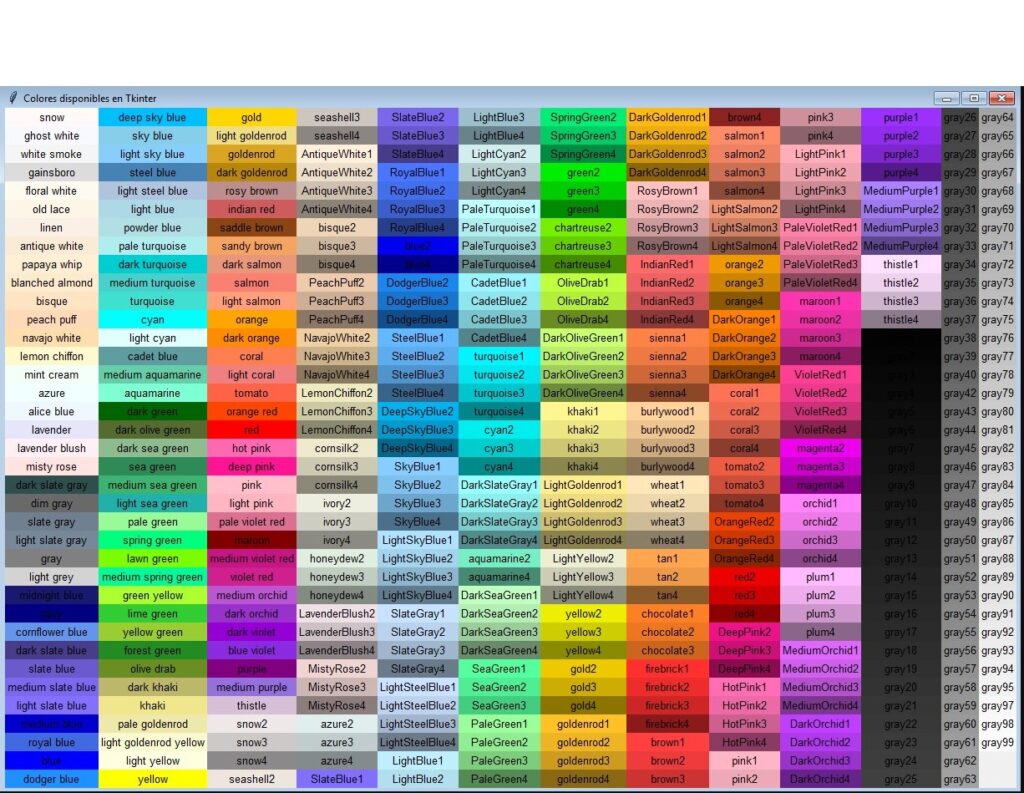
Un cop analitzades aquestes primeres línies de codi, intenta crear una calculadora, podeu utilitzar els següents colors